Wedding RSVP Made Simple
The Wedding RSVP Website That Does It All
Collect RSVPs, track meal choices, manage plus-ones, and check in guests on the big day: all from one beautiful link.
- Free to start
- No credit card required
- Setup in minutes

- Meal preferencesTrack dietary needs
- Plus-one managementControl companion invites
- Gift fundCollect monetary gifts
- QR check-inSmooth reception entry
What your guests see
One link. Meal choice, dietary needs and plus-one in a single reply.
Your guests open the link from the invitation, see the wedding details and your photo, and answer everything you need to know in one go. No account, no app, no reply card to post back.
- Your menu as the choices. Set the options once (beef fillet, sea bass, risotto) and guests pick from them.
- Plus-ones with their own answers. A guest adds their companion by name, and the companion gets their own meal choice and dietary field.
- Your look. The wedding template with your flyer, colours and wording, in any of 7 languages.
What you see
The headcount your caterer actually asks for
Every reply lands in one list: who is coming, who they are bringing, what each person eats. Filter by meal or diet, tag guests as family, bridal party or friends, and export the whole list as a CSV when the venue asks for final numbers.
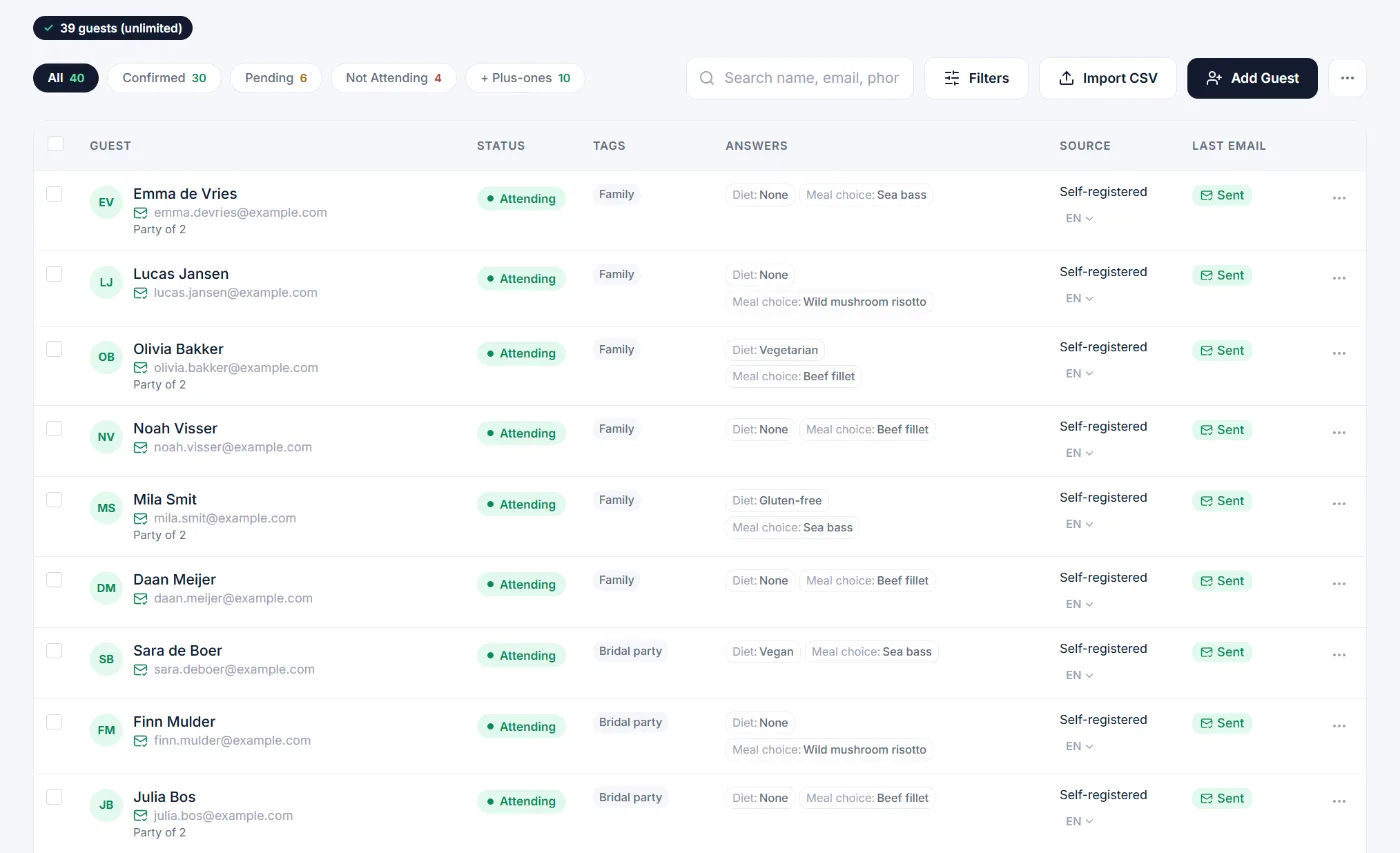
- Meal and diet per person
Companions are counted separately, so "party of 2" means two meals, two diets.
- Tags for seating
Tag guests by table or group and filter the list when you draw up the seating plan.
- One export
Names, replies, meals, diets and plus-ones in a single CSV for the caterer and the venue.
Who still has to reply
Stop chasing replies one by one
The counts update the moment a guest replies. When the RSVP deadline gets close, send one reminder to everyone who has not answered yet, instead of messaging them individually.
Three weeks after the invitations went out: 40 replies, 30 attending, 4 declined, 6 still to answer.
How a 120-guest wedding runs
From the first invitation to the last guest through the door
- Eight months before
Set up the event
Date, venue, your flyer, the three menu options and the dietary question. Allow one named plus-one per guest. Import the guest list from your spreadsheet.
- Six months before
Send the invitations
Email invitations go out from your guest list, each with that guest's own RSVP link. Or share one link in the family group chat and let guests add themselves.
- Six weeks before
Remind and finalise
One reminder to everyone still pending. Export the CSV with meals and diets for the caterer, and use the tags to draw up the seating plan.
- The day itself
Check guests in
Confirmed guests received a QR code by email. Your coordinator scans it at the door with a phone, so you know who has arrived without a clipboard.
What it costs for a wedding
Free up to 50 guests. One payment for a bigger wedding.
A wedding is one event, so you do not need a subscription. The free plan covers one event with up to 50 guests. For a larger guest list you upgrade that single event once and it stays unlocked: unlimited guests, your own branding, email invitations and reminders, and QR check-in on the day.
See the pricing page- Guests reply for free
No account, no app, no fee for your guests, whatever plan you are on.
- Gift fund included
Let guests contribute to your honeymoon during the RSVP.How the gift fund works
- Your data stays yours
Export everything as CSV at any time. EU data centres, GDPR compliant.
- Planning the whole wedding?
See thewedding guest list app
Wedding RSVP questions answered
Common questions about collecting wedding RSVPs online.
What is a wedding RSVP website?
A wedding RSVP website lets couples collect guest responses online instead of using paper reply cards. Guests confirm attendance, select meal choices, note dietary requirements, and add plus-one details, all from a single link shared via email or text.
Can I track meal choices and plus-ones in my wedding RSVP?
Yes! Add custom fields for meal preferences (chicken, fish, vegetarian), dietary restrictions (allergies, vegan, gluten-free), and plus-one details. Export a summary for your caterer with one click. All responses update your guest list in real time.
Is this free for wedding guest lists?
Yes, our free plan works for smaller weddings with up to 50 guests. For larger weddings, the Per Event plan unlocks unlimited guests, custom branding, payment collection, and advanced features at a one-time cost.
How do I send wedding invitations with RSVP links?
Add your guests (manually or via CSV import), customize your invitation email with wedding details, and send. Each guest receives a personalized RSVP link. You can also copy the registration link to include in physical invitations or your wedding website.
Can I use QR codes for wedding check-in?
Yes! Each guest receives a unique QR code with their RSVP confirmation. On the wedding day, your coordinator scans codes at the door with any phone for instant, contactless check-in. Know exactly who has arrived in real time.
Can guests contribute to a wedding gift fund?
Yes! Set up a gift fund page where guests can contribute any amount toward your honeymoon, new home, or any goal. Guests can give during RSVP or anytime via a shareable link. Payments are processed securely through Stripe.
Your RSVPs, sorted.
Create the event, add the first ten households and send yourself a test invitation. You will know in five minutes if this is for you.